
Set up late fees
Add late fee policies to a charge type, see when they apply, and reverse a late fee.
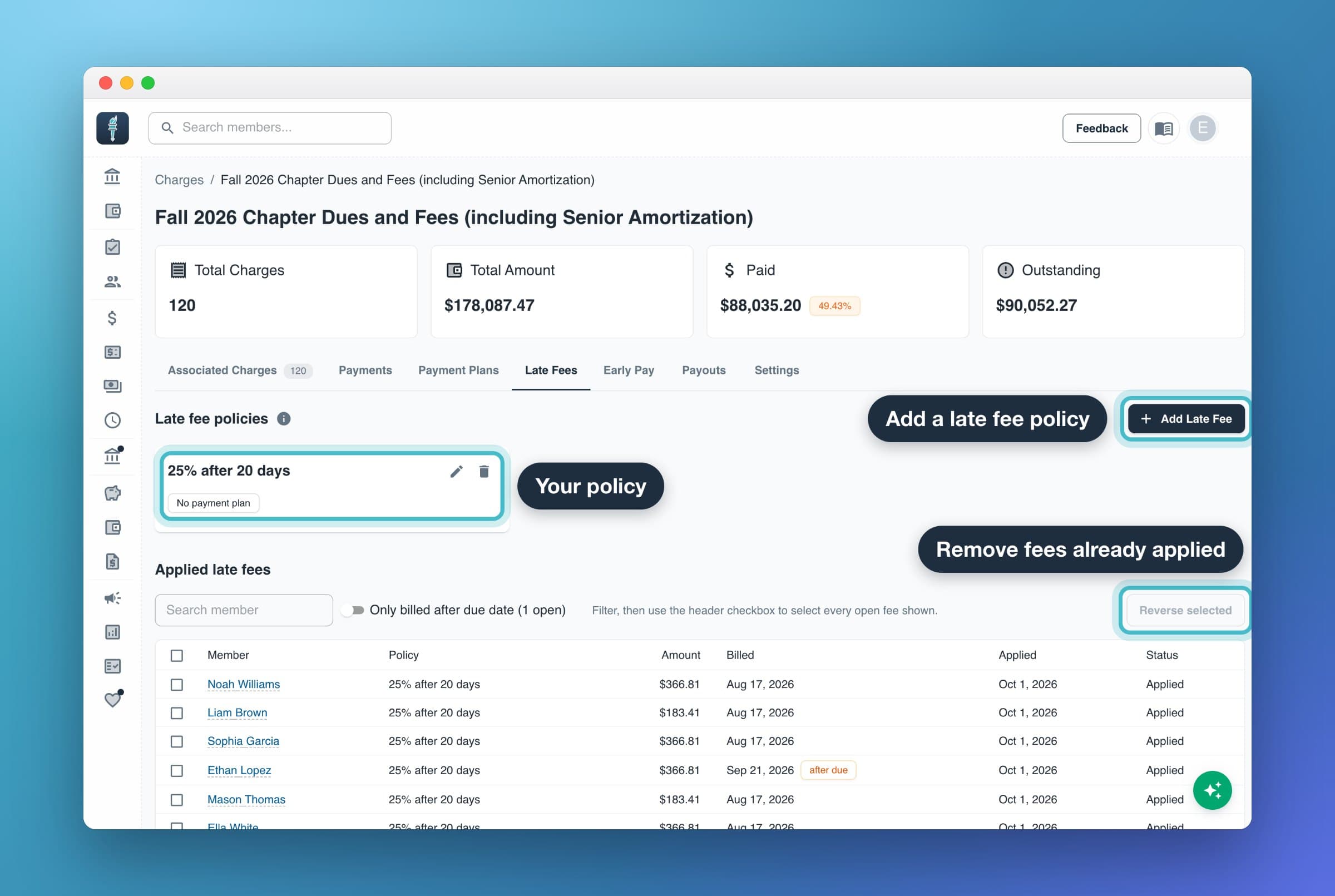
A late fee policy adds a fee to a charge that is still unpaid a set number of days after its due date. Chapter admins and officers who can edit charge types set policies on the web, on a charge type's Late Fees tab. You can also add them in the mobile app.
How late fee policies work
- Set on the charge type. A policy applies to every charge of that type, including charges already billed. A charge type can have several policies, for example $25.00 after 1 day and $50.00 after 30 days. Each one adds its fee to a charge only once.
- Applied at 12 AM, chapter time. Late fees are applied daily at 12 AM in your chapter's time zone. The shortest is 1 day: a charge due Sep 12 gets the fee at 12 AM Sep 13, so members always have the whole due date to pay.
- Flat or percent. A flat fee is a dollar amount. A percent fee is a percent of the charge's outstanding balance when the fee is applied.
- Balance threshold. A policy can apply only when the balance is over a dollar amount, or over a percent of the charge amount. $0 means any balance.
- Payment plans. A policy set to is without a payment plan skips charges that are on an approved plan. Proposed plans that you haven't approved yet don't count. A policy set to regardless of payment plan applies either way.
- The fee is added to the charge. It raises that charge's amount and balance, and shows up in the member's history as Late Fee Applied.
Late fees are never applied to archived charges, charges of an inactive charge type, or members who have been removed. Some older charges carry their own late fee policies. Those replace the charge type's policies for that charge.
Steps
- In Charges, open the charge type.
- Select the Late Fees tab.
- Under Late fee policies, select Add Late Fee.
- Fill in the sentence: "If still unpaid [days] days after the due date and has a balance exceeding [$ or %] and [is without a payment plan / regardless of payment plan] charge them [$ or % of outstanding balance]."
- Select Save.
To change or remove a policy, use the edit or delete icon on its card. Fees a policy already applied stay on members' charges until you reverse them.
A new policy also applies to charges that are already past its date. At the next 12 AM, every unpaid charge of that type more than the set number of days past due gets the fee at once. Check the type's open charges before you save.
What happens next
- The day before: if Late Fee Warnings is on in My Chapter > Reminders, members are emailed on the last day before a fee lands, telling them how much will be added and on which charges. They may also get a text or app notification, and parent contacts may get an email too. The setting is on by default and needs Enable All Reminders turned on. See Send payment reminders.
- Before the fee: members see a note on the charge, such as "$25.00 late fee on Oct 1", on the web, in the mobile app and on the pay page.
- At 12 AM: the fee is added. It's listed under Applied late fees on the charge type's Late Fees tab and on the member's Late Fees tab.
Reverse (waive) a late fee
Chapter admins can reverse late fees on the web.
- Open the charge type's Late Fees tab, or the member's page and its Late Fees tab.
- Under Applied late fees, check the fees to remove. On a charge type you can turn on Only billed after due date to find fees on charges you billed after their due date.
- Select Reverse selected, add an optional reason, then select Reverse.
The fee is credited back to the member's charge, and the history shows Late Fee Reversed. Members are not notified. A reversed fee can't be applied again by the same policy.
If the member already paid the late fee, reversing it does not send the money back. To return it, also issue a refund on the payment or add account credit. See Late fee removed: credit or refund? for what members see.
Common questions
Why did a charge get a late fee the night I billed it?
The charge was billed with a due date already more than the policy's days in the past. Reverse those fees with the Only billed after due date filter.
A member's plan was canceled and then they got a late fee. Is that right?
Yes. Once the plan is canceled the charge is no longer on an approved plan, so a policy that skips plans applies at the next 12 AM. You can reverse the fee if you choose.