
Remind members to pay
Automatic payment reminders, balance reminder texts, SMS segments, and what members and parents receive.
MyGreek reminds members to pay on its own, by email, text and mobile app notification, on a set schedule around each due date. Chapter admins choose which automatic reminders go out in My Chapter > Reminders. Officers with Send Communications can also text a balance reminder at any time from Balances or a member's page. All of this is on the web.
How automatic payment reminders work
- Per due date. Reminders follow each charge's due date. Charges with the same due date are reminded together in one message. A member with charges due on two different dates gets separate reminders for each.
- Email, text and app. Members get an email, plus a text if they have a phone number on file and a push notification if they use the mobile app. Automatic texts don't use your chapter's SMS segments.
- Parents too. Parent contacts get an email in the evening on the days the member was reminded. See What parent contacts get from reminders.
- Unpaid amount. The amount in a reminder is what's still unpaid on those charges, including any late fees already added.
Automatic reminders stop for a charge when any of these is true:
- It's paid in full.
- It's on a payment plan, whether proposed or approved. The member then gets plan reminders instead.
- The charge is archived, or its charge type is inactive.
- The member is archived. Members who are only inactive, resigned or graduated still get reminders while they owe.
Charges with no due date don't get automatic reminders.
Turn automatic reminders on or off
Chapter admins can change these settings.
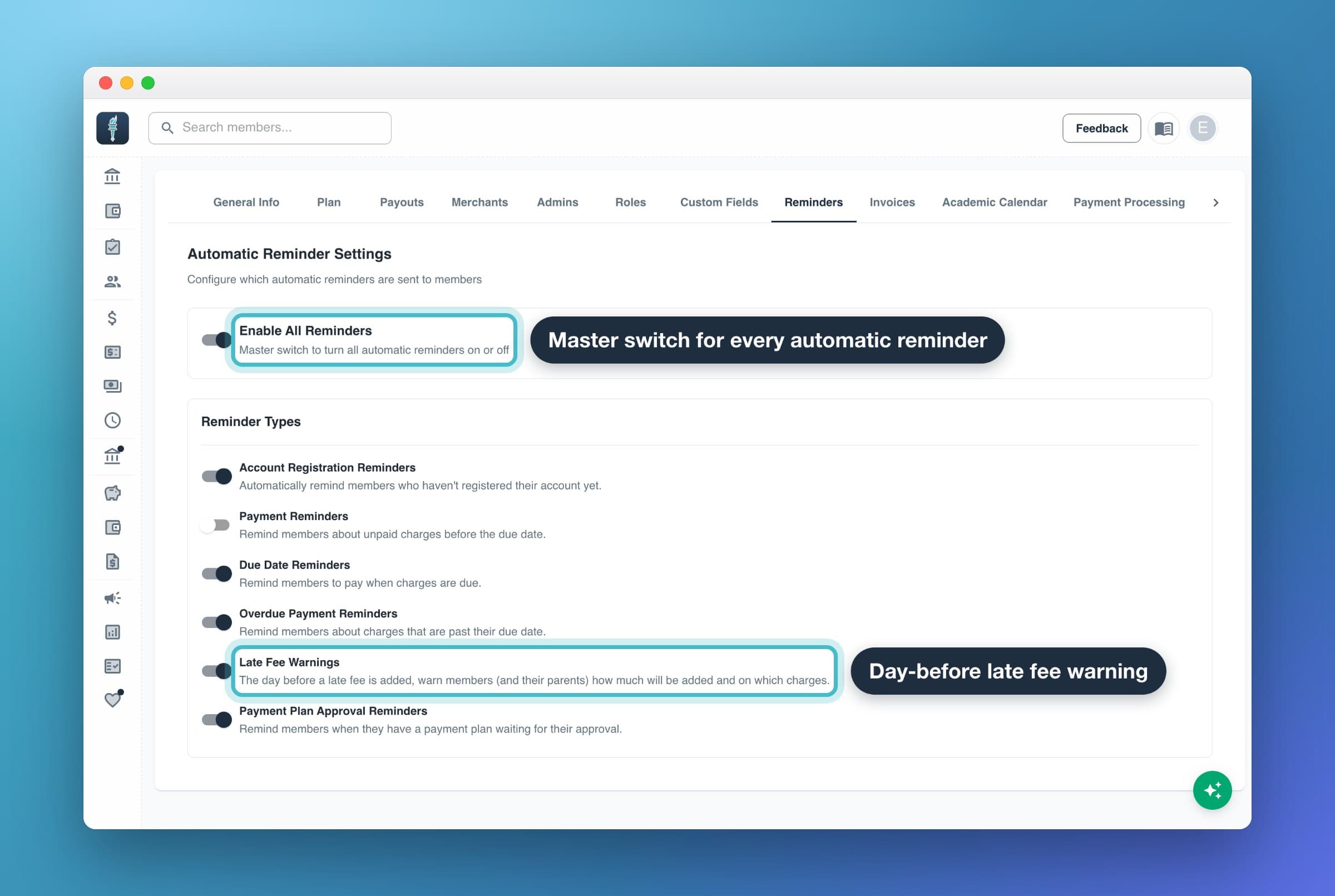
- Open your profile menu and select My Chapter.
- Select the Reminders tab.
- Turn Enable All Reminders on or off. Off stops every automatic reminder, including late fee warnings and the email before each plan payment.
- With the master switch on, turn each reminder type on or off. Changes save right away.
| Setting | Default | What it sends |
|---|---|---|
| Enable All Reminders | On | Master switch. Off turns every type below off. |
| Account Registration Reminders | On | Doesn't currently send anything on its own. To nudge members who haven't set up their account, resend their invites. |
| Payment Reminders | Off | Reminders for charges due more than 14 days from now. |
| Due Date Reminders | On | Reminders from 14 days before the due date to 14 days after it. |
| Overdue Payment Reminders | On | Meant for charges more than 14 days past due. These aren't sent right now, so regular reminders end 14 days after the due date. |
| Late Fee Warnings | On | A warning on the last day before a late fee is added. See Set up late fees. |
| Payment Plan Approval Reminders | On | Reminders about proposed plans waiting for someone to accept or approve them. |
Automatic reminder schedule
| Reminder | When it goes out | Who gets it |
|---|---|---|
| Payment Reminders (off by default) | While a charge is due more than 14 days out: right away, then 2, 3 and 5 days apart, then weekly | Member (email, text, app); parent contacts (email) |
| Due Date Reminders | 14, 7, 3 and 1 days before the due date, on the due date, and 1, 3, 7 and 14 days after it | Member (email, text, app); parent contacts (email) |
| Late Fee Warnings | The last day before a late fee is added. Fees are added at 12 AM chapter time. | Member (email, text, app); parent contacts (email) |
| Payment Plan Approval Reminders, for a plan you proposed | The morning after you propose it, 2 days later, then every 3 days until the member accepts it | Member (email, text, app) |
| Payment Plan Approval Reminders, for a plan a member proposed | Same schedule | Your admins (app notification) |
| Upcoming plan payment | The evening before each scheduled plan payment | The payer (email only) |
Member reminders go out in the morning. Parent reminders go out at about 6 PM in your chapter's time zone.
When a late fee warning goes out, it replaces that day's regular reminder for the same charges, so members don't get two messages.
What parent contacts get from reminders
Parent contacts get emails, never texts. From reminders they get:
- A payment reminder email at about 6 PM chapter time, on the days the member got a Payment Reminders or Due Date Reminders reminder that morning. The balance is checked again at send time, so if the member paid during the day, the parent isn't emailed.
- A late fee warning email the evening before a late fee is added, if Late Fee Warnings is on.
Parents don't get payment plan approval reminders. See Add parent contacts for every email parents get.
Send a balance reminder text to everyone who owes
Officers with Send Communications can text every member who owes at once from Balances.
- In Balances, select Send Reminder Text.
- Check the preview and the SMS Segments Information box: your Chapter Balance, the Estimated Usage and what's left After Send.
- Select Send Reminder Text.
Who gets it: active members with a balance and a phone number on file, except members whose payment plan covers all their charges. Members don't need to have set up their account.
Limits:
- These texts use your chapter's SMS segments, usually 1 per member. If you don't have enough, the dialog says Insufficient balance! and you can't send until you select Refill Segments and buy more.
- You can send once every 5 minutes.
- There's no one-click balance email to everyone. Automatic reminders cover email.
Text one member a balance reminder
Officers with Send Communications can text a single member from their page.
- In Members, open the member.
- Next to Shareable Payment Link, select the send icon (Text balance reminder).
- Check the preview, then select Send Text.
The member needs a phone number and a balance. If they're on an approved payment plan, the dialog notes that bulk reminders skip them, but you can still send. The text is signed with your name and uses your chapter's SMS segments.
To write your own message to one member, a group or everyone, send an announcement and pick the Balance Reminder quick template. It fills in each member's name, balance and payment link.
SMS segments: which texts use them
A segment is one piece of a text message, about 160 characters. Longer texts use more than one, and emojis use extra. Your chapter's balance is in My Chapter > SMS Segments.
Texts your officers send use segments:
- Balance reminder texts, to everyone or to one member
- Announcements sent by text
- Invite reminder texts
Texts MyGreek sends on its own don't use segments. That includes automatic payment reminders, late fee warnings, plan approval reminders and bill notices.
The Plus plan includes 1,000 free SMS segments per month. Any chapter can buy more.
Buy more SMS segments
Chapter admins can buy segments.
- In My Chapter, select the SMS Segments tab.
- Select Refill Segments.
- Choose an amount and a chapter payment method.
- Select Purchase Segments.
| Package | Price | Per segment |
|---|---|---|
| 250 segments | $6.25 | $0.025 |
| 500 segments | $10.00 | $0.020 |
| 1,000 segments | $15.00 | $0.015 |
The segments are added as soon as the payment goes through. The tab warns you when you're under 200 segments, and again under 50.
When you run out, texts your officers send can't go out: the send button is disabled, or the send fails with a message to buy more segments. Emails, app notifications and automatic reminder texts keep going.
What members and parents receive in reminders
Reminder emails come from MyGreek. Each one greets the member by first name, states the amount and due date, adds any upcoming late fee or early pay discount, and ends with their payment link (pay.mygreek.us/their-code), which they can share with a parent. Sample subjects and texts:
| Reminder | Email subject | Text |
|---|---|---|
| 1 to 14 days before | Payment Due Tomorrow, Payment Due In 7 days | "$450.00 due in 7d. Pay at pay.mygreek.us/AB12CD or login to propose a payment plan." |
| Due date | Payment Due Today | "$450.00 due TODAY! Pay now at pay.mygreek.us/AB12CD or login to propose a payment plan." |
| 1 to 3 days late | Payment Past Due - Pay Now | "$450.00 is 1d past due. Pay at pay.mygreek.us/AB12CD or login to app.mygreek.us to propose a payment plan." |
| 7 and 14 days late | Payment Past Due - Consider a Payment Plan | "You have $450.00 past due. Pay at …" |
| Late fee warning | Last day to avoid a $25.00 late fee | "Last day: a $25.00 late fee will be added to your balance after today (Sep 30). Pay at … to avoid it." |
| Plan you proposed | Payment Plan Awaiting Your Approval | "Payment plan pending your approval for $450.00. Login to review at app.mygreek.us" |
| Upcoming plan payment | You have an upcoming payment to [chapter] | Email only |
If a late fee policy will add a fee to the charge, regular reminders say so too, for example "$25.00 late fee after Sep 30."
Parent emails use the student's name in the subject, such as "Payment Due Soon for Jordan Smith" or "Last day to avoid a $25.00 late fee for Jordan Smith".
The wording is the same for every chapter, and you can't edit it. To write your own message, send an announcement.
Members can't turn payment reminders off themselves. Reminders stop when the member pays or gets on a plan, or when you turn them off for the whole chapter.
Common questions
A member says they never got any reminders. Why?
Check these, most likely first:
- Contact info. Open the member and check their email and phone. A warning icon next to either one means messages to it bounced. Admins also get a Member Email Bounced email when that happens. Fix the address or number on their page.
- A plan. Charges on a proposed or approved payment plan get plan reminders, not payment reminders.
- More than 14 days past due. Regular reminders end 14 days after the due date. Send a balance reminder text instead.
- No due date, an archived charge, or an inactive charge type.
- Your settings. Check that Enable All Reminders and Due Date Reminders are on in My Chapter > Reminders.
- No texts. Texts need a phone number on the member's profile.
Why did a member get a text the moment I billed them?
That's the bill notice, not a reminder. MyGreek notifies members (and emails parent contacts) when you charge them, and reminder settings don't control it. See Charge members.
Can I change the wording of reminders?
No. Reminder emails and texts use fixed wording. You can set the "Questions about your bill?" contact line in My Chapter > Invoices, but it appears on bill emails and invoices, not on reminders.
Can I stop reminders for one member?
Not on their own. Reminders stop when a charge is paid, put on a payment plan or archived, or when the member is archived. Archiving also cancels their plans, so use it only for people who should leave MyGreek.
Do reminders go out at night?
No. Automatic member reminders go out in the morning, and parent emails at about 6 PM chapter time. Bill notices are different: they go out when you create the charge, so a charge created late at night texts members right away.